No Installation Required
Open the app in a supported desktop browser. Optional installation adds a desktop shortcut and a dedicated window. AI models download when needed.
Browser-based motion analysis
Review motion frame by frame, measure angles and distances, track movement, and compare trials in one workspace. Build graphs and export quantitative results directly from your browser. For biomechanics, gait, sports technique, and ergonomics.
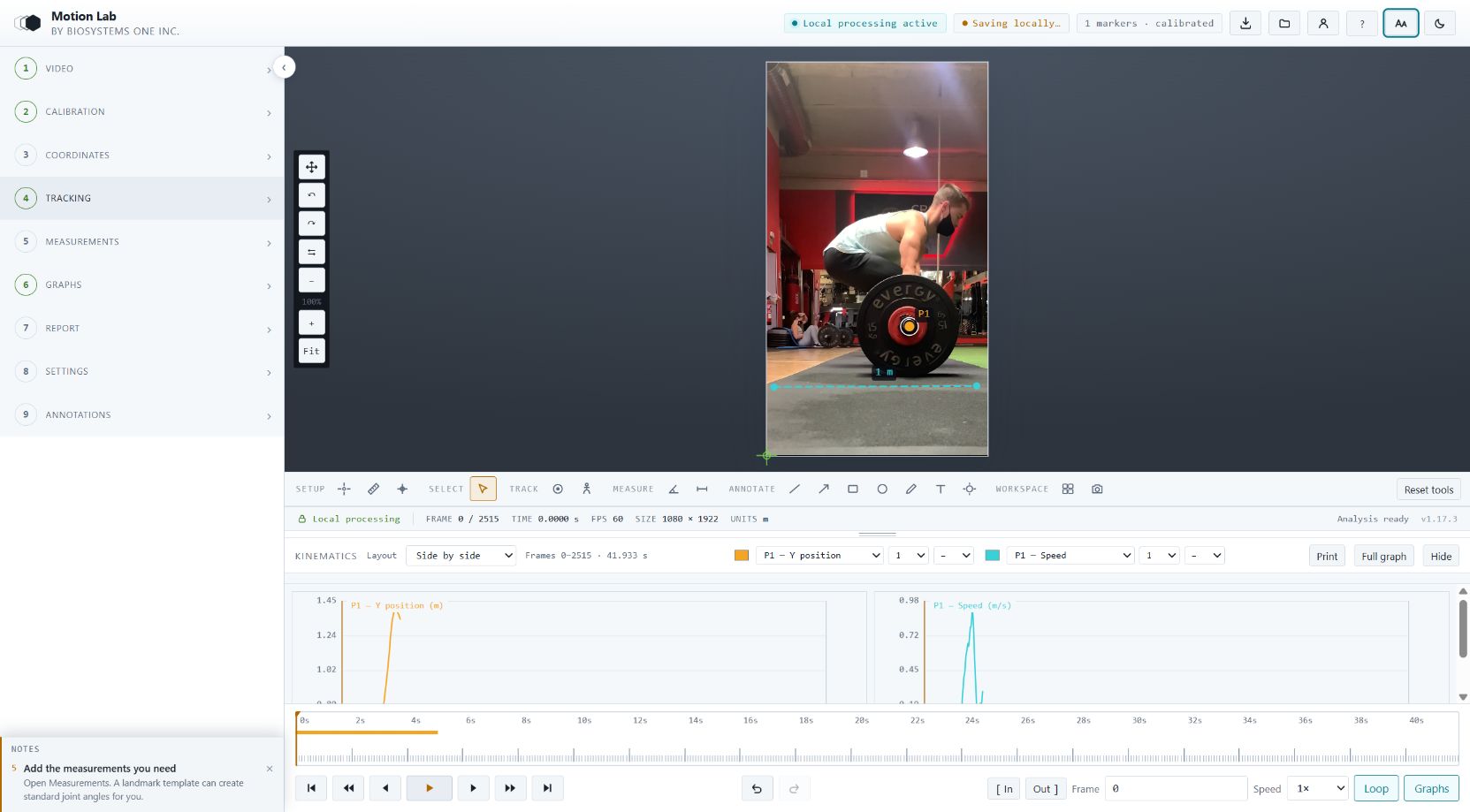
Actual MotionLab workspace: a local video, calibrated landmark tracking, and position and speed graphs side by side. Select the screenshot to view it at full size.
Why MotionLab
Work from a browser or install MotionLab in its own desktop window. Your video, tracking tools, graphs, and report options stay together.
Open the app in a supported desktop browser. Optional installation adds a desktop shortcut and a dedicated window. AI models download when needed.
Video decoding, tracking, measurements, and graphs run on your computer. Source footage stays local; you choose whether to sync analysis projects.
Choose manual digitization, image-feature tracking, or AI pose estimation. Review uncertain points, calibrate your study, and report the methods behind the results.
How It Works
Name the trial, select the working range, and move through the analysis steps. Dedicated Report, Settings, and Annotations menus keep each task within reach.
Name your trial and open a video or image. Set In and Out to choose the portion to analyze, confirm the recording rate, then calibrate distance and coordinates. The default origin is the bottom-left corner, with Y upward.
Choose an anatomical landmark template, mark or estimate its landmarks, and select the tracking method suited to the footage. Then define the joint angles and distances required by the study.
Plot time series or X–Y paths over the selected range. Arrange multiple graphs, adjust their dimensions and line styles, then choose the data, figures, and report sections to export with Pro.
Source footage stays on your device. Saved projects retain analysis settings and results; reopening a project may require selecting its original video again.
Capabilities
Local tracking, calibrated measurements, flexible graphs, and configurable reports. Pro adds AI pose tracking, multi-video comparison, and professional exports.
Frame-accurate stepping, adjustable playback speed, a working range, and a scrubber that shows every frame as a tick. High-speed footage reports true times rather than playback times.
Track manually placed landmarks from frame to frame, or use Pro AI pose tracking to estimate anatomical landmarks across the selected range. Review low-confidence and occluded points before using the results.
Measure joint angles, segment orientation, and calibrated distances. Set a known length or use four-point plane calibration for perspective within the reference plane. Motion outside that plane remains a limitation.
Landmark paths grow as you advance through the video and shorten when you scrub backward. Adjust labels, landmarks, and segment thickness; save the current frame with analysis overlays using Pro.
Export tracking and graph data to Excel (.xlsx) or CSV. Save graph figures, print to PDF, or build an HTML report with the trial name, model-fitting image, selected graphs, summaries, and methods.
Name and rename trials, save locally or sync projects with an account. Recovery keeps analysis after a refresh; select the source video again when requested. Folder saving is available in supported browsers.
Add two, three, or four videos or images in the same workspace. A colored border identifies the active view for the shared tools. Focus on one view without closing the others.
Plot position, velocity, acceleration, angles, or an X–Y joint path. Arrange graphs side by side, in rows, tabs, or an overlay. Resize the graph area and edit parameters, colors, weights, and styles from the legend.
Technology
Build a report around your study. Choose the images, graphs, and results to include, and add methods and point provenance so readers can interpret the analysis.
| Trial identity | Project or trial name |
|---|---|
| Model-fitting image | The first frame with all linked landmarks placed, with segment overlays |
| Graphs | Selected parameters, legends, and the working In–Out range |
| Results | Measurements, range summaries, and events |
| Methods | Frame rate, calibration, coordinates, filtering, and tracking provenance |
| Multiple videos | Arrange model-fitting images side by side or one after another |
Select the tracking and processing settings that fit your footage. Check estimated landmarks against the video before interpreting derived motion.
Single-camera 2D cannot measure motion toward or away from the lens. MotionLab states that limit rather than working around it, and records the calibrated plane every measurement depends on.
Who It Is For
Your Data
Movement video of a real person is identifiable, often clinical, and frequently covered by an ethics approval. MotionLab is built so it never has to leave the machine it was recorded on.
Pricing
Start with local video analysis, manual and image-feature tracking, measurements, and graphs. Pro adds AI pose tracking, multi-video comparison, estimated kinetics, and data, image, figure, and report exports.
Learning, teaching and evaluation. No account needed to start.
For coursework, self-teaching, classroom demonstration and trying MotionLab on your own data before you buy. Signing in is free and optional — it saves your projects, it does not unlock exports.
Start FreeResearch, engineering and professional work. Cancel any time. Works out at $16.67 a month. Saves $88 a year
Built for professional exports used in publications, teaching materials, and technical reports.
Try it, then upgradePrices in USD. Visit Pricing for subscription details or contact support about academic and lab options.
Who Builds It
A research and development company working across biomedical and biosystems engineering. MotionLab came out of biomechanics research needs that existing tools met awkwardly or expensively.
Questions
No. Open MotionLab in a supported desktop browser. Chrome and Edge also support desktop installation and local-folder access. Prepare the app and required AI models while online before working offline. Browser support for codecs and advanced features varies.
Once the app shell is cached, local analysis can reopen offline. AI needs its model files downloaded first. Sign-in, billing, and cloud sync require a connection; Pro access may require online verification. Recovery restores analysis, but the original source video may need to be selected again.
Source videos and images are read locally. Optional cloud projects store analysis settings and results, not footage. Account, billing, and email services handle their own necessary data, as described in the Privacy Policy.
Use Google or email and password. An account is optional for local analysis and required for cloud project sync and Pro features. Password reset is available from the sign-in page.
Anything your browser can decode — MP4 (H.264) and WebM are the safest. Some MOV, HEVC and ProRes files will not open; re-encoding to H.264 MP4 fixes it. For still work, JPG, PNG and WebP are all supported.
Accuracy depends on calibration, camera placement, resolution, motion blur, occlusion, and landmark placement. AI locations are estimates and can identify the wrong joint or subject. Review tracks against the footage; a confidence score does not guarantee accuracy. Single-camera 2D does not measure depth.
Yes — that is what the report is for. It records the frame rate and where it came from, the calibration method and reference, the filter type and cutoff, the analysed range, and how many points were measured versus estimated. Anything unconfirmed is flagged rather than hidden.
Free includes local video review, calibration, manual and image-feature tracking, measurements, and graphs. Pro adds AI pose tracking, multi-video comparison, estimated kinetics, and exports. A free account can sync analysis projects.
When Pro access ends, your account returns to Free. Basic analysis and project access remain available; exports, AI pose tracking, multi-video comparison, and other Pro tools require an active entitlement.
Open a local video and begin with calibration, landmarks, and measurements. No account is needed to try the core analysis tools.